RT3D IRI Cartesian Ray Trace
Pure-Python 3D RT Workflow
Build a 3D IRI profile on a `(lat, lon, alt)` grid, run RT3D oblique fan tracing, and generate side/front plus route-aligned 3D face plots.
This page explains:
examples/run_rt3d_iri_cartesian.py
Call Flow
main()parses--configand--event._run(...)loads a 3D profile:RT3DProfile.from_cfg(..., fetch_iri=True, fetch_geomag=...)- Tracing grid is extended to ground (default):
extend_to_ground=trueadds0..z_floorwith zero density.- Optional collision volume is built:
ComputeCollision.from_nrlmsise_3d(...)- on failure, zeros are used.
RT3D(profile=...)initializes solver state._trace_fan(...)runs all rays via:RT3D.oblique_trace(...)- If Hamiltonian fails for most rays, script retries with gradient solver.
- Figures are created:
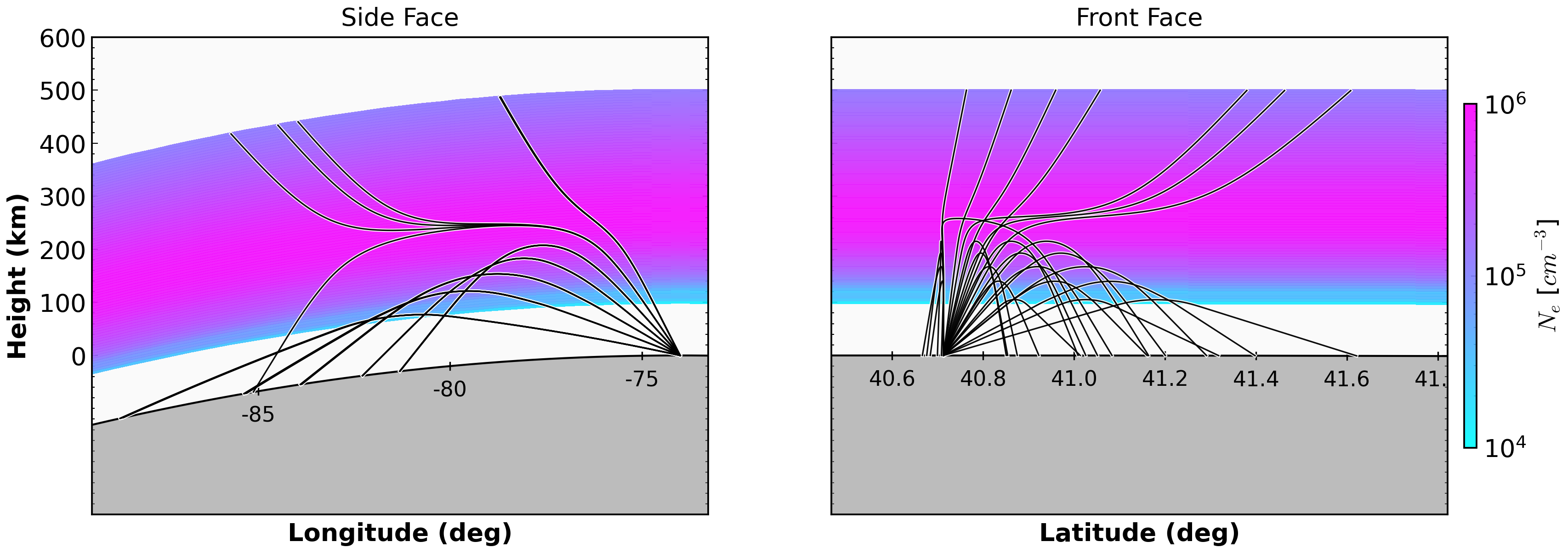
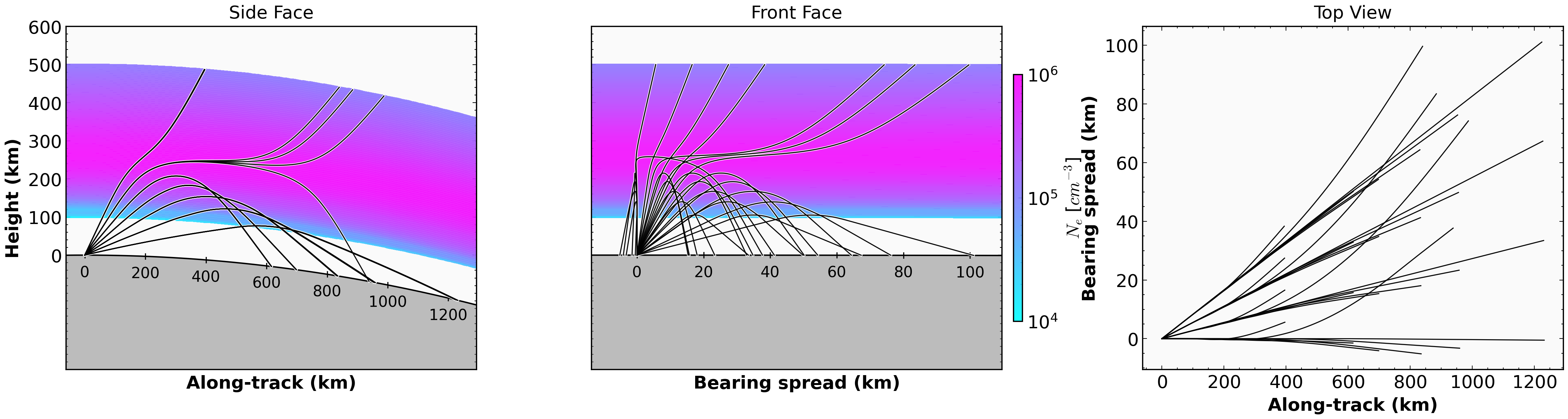
_plot_ray_faces(...)-> side/front in lat/lon views_plot_route_faces(...)-> 3-panel route view: along-track, bearing-spread, and top view
Solver Notes
config3D.jsoncontrols default coordinate/solver:use_spherical-> spherical or cartesian tracingsolver->"hamiltonian"or"gradient"- The script includes robust fallback from Hamiltonian to gradient when failure ratio is high, to keep example outputs usable.
Key Code
1) Build RT3D Profile
rt_profile = RT3DProfile.from_cfg(
    cfg=cfg,
    time=event_time,
    fetch_iri=True,
    fetch_msise=False,
    fetch_geomag=fetch_geomag,
    workers=workers,
)
2) Run 3D Fan Traces
out = rt.oblique_trace(
    freq_hz=float(f_mhz) * 1e6,
    elevation_deg=float(el),
    azimuth_deg=float(az),
    coordinate_system=str(coordinate_system),
    solver=str(solver),
    x0_km=float(x0_km),
    y0_km=float(y0_km),
    z0_km=float(z0_km),
    mode="O",
    formulation="appleton-hartree",
    collision_hz=collision_hz,
    b_abs_t=b_abs_t,
    b_psi_deg=b_psi_deg,
    max_step_km=2.0,
)
3) Plot Faces
_plot_ray_faces(
    ne_grid=ne_plot,
    ray_path_data=ray_paths,
    lats=rt_profile.lats,
    lons=rt_profile.lons,
    heights=heights_plot,
    origin_lat=origin_lat,
    origin_lon=origin_lon,
    out_file=out_file,
)
and
_plot_route_faces(
    ne_grid=ne_plot,
    ray_path_data=ray_paths,
    lats=rt_profile.lats,
    lons=rt_profile.lons,
    heights=heights_plot,
    origin_lat=origin_lat,
    origin_lon=origin_lon,
    bearing_deg=bearing_ref,
    out_file=out_file_route,
)
The route-aligned panel uses PlotRays3DRouteFaces and now renders:
- along-track vs height
- bearing-spread vs height
- top view (
along-trackvsbearing-spread)
By default, the colorbar is anchored after panel 2 and the spacing between panel 2 and panel 3 is widened for readability.
Run
Custom run:
python examples/run_rt3d_iri_cartesian.py \
  --config hfpytrace/cfg/config3D.json \
  --event 2017-05-27T16:00:00Z
Output Figures
Related Files
examples/run_rt3d_iri_cartesian.pyhfpytrace/model/rt3d.pyhfpytrace/density/iri.pyhfpytrace/collision.pyhfpytrace/plottrace.py